Cute Little Animals for Children: A Practical Guide to Using Digital Assets Effectively
When designing products or content for a young audience, the visual tone sets the immediate expectation. Cute Little Animals for Children is more than just a collection of adorable imagery; it is a comprehensive digital asset pack designed to streamline creative workflows for educators, parents, and small business owners. This specific collection provides a cohesive aesthetic that balances playfulness with professional quality, ensuring your projects look polished rather than amateurish. However, owning high-quality assets is only half the battle. The difference between a stunning final product and a frustrating design failure often lies in understanding technical specifications and licensing before you begin.
Many creators, especially those new to digital design, assume that downloading a file guarantees a perfect result. Unfortunately, without proper knowledge of resolution, file formats, and editing requirements, even the best assets can yield disappointing outcomes. This guide addresses common pitfalls associated with using this animal-themed collection and offers practical corrections to ensure your nursery decor, educational materials, or merchandise meet professional standards.
Understanding What You Are Actually Buying
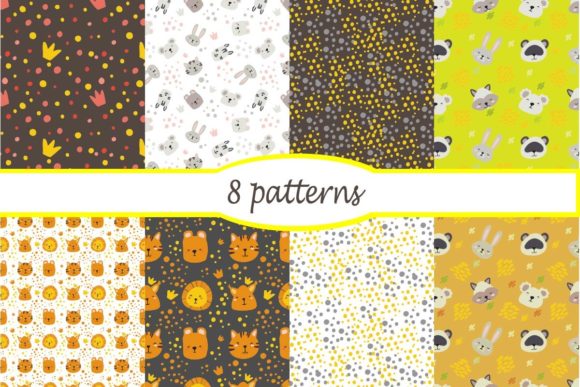
A frequent mistake occurs when buyers confuse "digital download" with "ready-to-use physical product." Cute Little Animals for Children is a purely digital resource. It does not arrive as printed stickers or fabric. Instead, the set contains eight seamless patterns with baby prints, one set of stickers featuring animals and decorative elements, and a complete alphabet. All files are delivered in both JPEG and EPS10 formats at 300 DPI with dimensions of 4000 × 4000 pixels.
Why does this distinction matter? If you intend to use these for physical products like mugs, T-shirts, or wall drawings, you must have the means to print them yourself or send the files to a professional printer. Assuming these files will automatically resize for any application without quality loss is incorrect. While 4000 × 4000 pixels is substantial, it has limits. Understanding these boundaries prevents pixelation on large-format prints and ensures crisp results for digital postcards and blog backgrounds.
The Critical Role of File Formats and Editing Software
One of the most significant oversights involves ignoring the EPS10 format. Many beginners rely solely on the JPEG files because they are universally viewable. While JPEGs are excellent for web backgrounds and digital photo albums, they are raster images composed of fixed pixels. If you need to resize an animal sticker for a tiny clothing tag or scale up a pattern for a large banner, the JPEG may lose integrity.
The EPS10 files included in this set are vector-based. Vectors use mathematical equations rather than pixels, allowing infinite scaling without quality degradation. To utilize these files effectively, you must have compatible image editing software. Programs like Adobe Illustrator, CorelDRAW, or Affinity Designer are necessary to open and manipulate EPS10 files. Attempting to edit vectors in basic photo viewers or unsupported software will result in errors or forced rasterization, negating the benefits of the vector format.
Practical Advice: Before purchasing or starting a project, verify that your current software supports EPS10. If you lack vector editing tools, commit to learning the basics or stick strictly to the high-resolution JPEGs within their optimal size range. Do not assume free online converters will preserve the editable layers of the vector files; they often flatten the artwork, removing your ability to customize colors or elements.
Resolution Realities: Avoiding the Pixelation Trap
High resolution is a selling point, but it is not a magic fix for improper usage. The assets in Cute Little Animals for Children are rendered at 300 DPI (dots per inch), which is the industry standard for professional printing. At 4000 × 4000 pixels, this translates to a printable area of approximately 13.3 inches by 13.3 inches. This size is perfect for standard greeting cards, apparel graphics, and scrapbook pages.
However, a common error arises when users attempt to stretch these files beyond their native resolution for large wall drawings or banners. Stretching a 300 DPI image to fit a 3-foot wide space drops the effective resolution to roughly 100 DPI, resulting in blurry, unprofessional output. Conversely, using these massive files for small web icons without optimization leads to slow website loading times, harming user experience and SEO performance.
- For Print: Always check the physical dimensions required. If your project exceeds 13x13 inches, utilize the EPS10 vector files to scale up without losing clarity.
- For Web: Export resized JPEGs at 72 DPI or optimized PNGs to maintain site speed while preserving visual appeal.
- For Merchandise: Verify the printer’s specific template requirements. Some POD (Print on Demand) services require specific color profiles (CMYK vs. RGB) that may need conversion from the source files.
Licensing and Commercial Application Misunderstandings
Creators often overlook the legal and ethical parameters of digital assets. Just because a file is high-quality does not mean it is unrestricted. When using Cute Little Animals for Children for commercial ventures like selling printed T-shirts or digital planners, you must understand the license terms associated with the purchase. A common pitfall is reselling the digital files themselves or using them as standalone stock, which typically violates standard licensing agreements.
Furthermore, consistency is key in branding. Using only two or three elements from the set while mixing in unrelated clip art from other sources creates a disjointed visual identity. The value of this specific collection lies in its cohesion. The seamless patterns, stickers, and alphabet are designed to work together. Leveraging the full suite ensures that your digital postcards match your website background and your physical merchandise, creating a trustworthy and professional brand presence.
Technical Preparation Checklist
To avoid wasted time and resources, perform these checks before integrating these assets into your workflow:
- Software Compatibility: Confirm your editing software opens EPS10 files natively. Test this immediately upon download.
- Color Profile Verification: Determine if your end-use requires CMYK (print) or RGB (screen). Convert files appropriately before editing to avoid unexpected color shifts.
- Storage and Backup: These high-resolution files consume significant storage. Ensure you have adequate cloud or local backup to prevent data loss.
- Project Sizing: Set up your document canvas to match the intended output size before placing images. Upscaling after placement degrades quality.
- License Review: Re-read the usage rights specifically regarding commercial printing and digital redistribution to protect your business.
Making Informed Creative Decisions
Cute Little Animals for Children offers immense potential for creating engaging, heartwarming content and products. The combination of seamless patterns, versatile stickers, and a matching alphabet provides a robust foundation for everything from nursery wall art to educational blogs. However, the quality of your final output depends entirely on your technical proficiency and preparation.
By respecting file formats, understanding resolution limits, and ensuring software compatibility, you transform these digital files from simple downloads into powerful professional tools. Avoid the frustration of trial-and-error by approaching these assets with a clear technical strategy. When used correctly, this collection not only saves time but also elevates the perceived value of your creative work, resonating authentically with both children and the adults who care for them.